Distributed CVS? Why not?
I’m writing CVS, but what I really mean is a distributed version control system (DVCS for short).
CVS, SVN, and other such systems are centralized. You access a single local repository. To make a change, you need the appropriate permissions. If you want to work in parallel, for example to maintain the main development line alongside an older line for fixes, these systems require you to fork a branch. Branching is the only way to work in parallel on one repository. If you need to bring work from two branches together, you have to merge them. Anyone who’s ever done it knows how painful that can be.
One common situation tools like CVS handle poorly is when two developers work on the same set of files in parallel and at some point need each other’s changes. They have two options: exchange changes manually and apply them, or commit them straight to the repository. Both are painful. In the first case you have to make and apply a diff by hand, which is awkward. In the second you can introduce unfinished changes that temporarily cause problems. The central repository was only there to synchronize the two developers.
Distributed version control system (DVCS)
That leads me to DVCS. Unlike centralized systems, distributed version control systems can have several repositories instead of a single central one. The workflow is different from the centralized approach. A developer can copy the repository locally and start working on it, with commits, updates, and the other familiar operations. Those changes go to the developer’s local repository. When they decide their repository or work is in the right state, they merge their local repository with another one.
Let’s use the earlier example to see how to work with a DVCS. We have a main development repository. Developer one makes a local copy and developer two does the same. When they need to synchronize, they use the DVCS to merge between their local repositories. They keep all the changes locally. Once they agree, one can put them in the central development repository with an ordinary commit.
The Workflows article in the documentation for Bazaar, a DVCS, describes ways to work. It’s worth a look because the diagrams explain it nicely. It describes these models:
- Solo
- Partner
- Centralized
- Centralized with local commits
- Decentralized with shared mainline
- Decentralized with human gatekeeper
- Decentralized with automatic gatekeeper
The last two caught my attention. Here’s why. A decentralized workflow with a human gatekeeper is well suited to open-source projects. Imagine working on an open-source project without permission to commit changes. With a DVCS, the maintainer can pull changes from your local repository, merge them, and commit them to the central repository if everything looks good. Jason Van Zyl, the lead developer of Maven, advocates this approach, as you can see in his email to the developers’ mailing list. Git is one particular DVCS.
For anyone who wants to make changes to Maven but doesn’t have access I am going to setup a GIT repository to try and enable some
distributed development. After using GIT for about a week I’m having
a hard time using SVN but obviously we’re not going to be switching
anytime soon.
But for anyone who has patches or wants to try and work with me to
get changes in I am going to try this method of publishing Maven as a
GIT repository which will allow anyone to clone the repository and
work on any changes you like in a controlled way. Once you clone you
can commit changes to your own copy of Maven and do whatever you
like. Then in order for me to see your changes I can simply pull from
your originally cloned repository to a branch on my side and merge.
Merging is sooooooo easy with GIT. So easy in fact that it makes you
wonder how SVN got it so wrong and makes it so painful compared to GIT.
A similar model is used for the Linux kernel, for example. Lins Torvalds explains the DVCS philosophy well in the email clarification on git, central repositories and commit access lists, where he tries to explain the benefits of a DVCS for KDE desktop development.
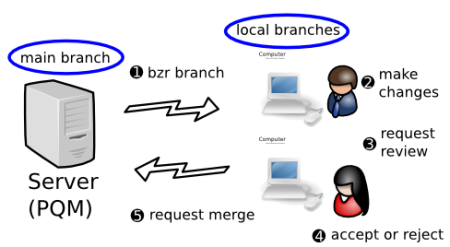
The second workflow, decentralized with an automatic gatekeeper, caught my attention because it incorporates a delayed commit. The commit only goes through once conditions are met, such as passing tests or completing a review. This approach is useful before a release when each change needs careful scrutiny to avoid introducing a bug.
each developer has their own branch or branches, plus read-only access to the mainline. A software gatekeeper (e.g. PQM) has commit rights to the main branch. When a developer wants their work merged, they request another person to review it. Once passed review, either the original author or the reviewer asks the gatekeeper to merge it, depending on team policies. The gatekeeper does a merge, a compile, and runs the test suite. If the code passes, it is merged into the mainline.
DVCS has advantages and disadvantages and probably doesn’t suit every project. I should add that you can use distributed version control systems the same way as centralized ones. Meanwhile, centralized systems are gaining features from distributed ones, such as SVN and local commits. If the DVCS approach interests you, I’d recommend these two articles by one of SVN’s coauthors.
Related articles
Related CZ Podcast episodes
- #261 · Leadership
On leading people and teams. · Czech audio