Eclipse tips: keyboard shortcuts
You can spot a proper geek by how quickly they can work their tools, ideally without touching the mouse. Like any IDE, Eclipse has plenty of keyboard shortcuts, but one is a little special. Press Ctrl+Shift+L and Eclipse shows you a list of all the available shortcuts and what they do.
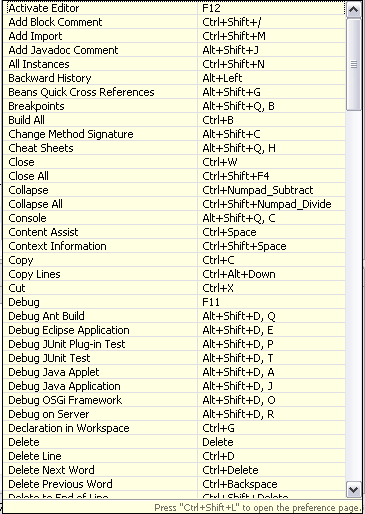
My favorite is Alt+Shift+L for Extract Local Variable. To try it, type new ArrayList() in the code editor, select the whole expression, and press the shortcut.
Related articles
Related CZ Podcast episodes
- #3 · Java 6 SE, Vývoj webových aplikací
Dagi and Filemon discuss Java 6 and web application frameworks. · Czech audio
- #1 · Vývojová prostředí v Javě
The first CZ Podcast episode looks at Java development environments. · Czech audio