Eclipse’s little details — My tasks
Every programmer occasionally leaves a FIXME or TODO in the source to come back to later. When several people work on a project, it’s usually difficult to find all the fixes and to-dos that belong to one programmer. Here’s how to use the Eclipse Tasks view and a filter to show just one group of those notes or tasks.
The developers have to be a little disciplined. Each person adds a tag to their own to-dos and fixes so the tasks can be filtered. The next screenshot shows that.
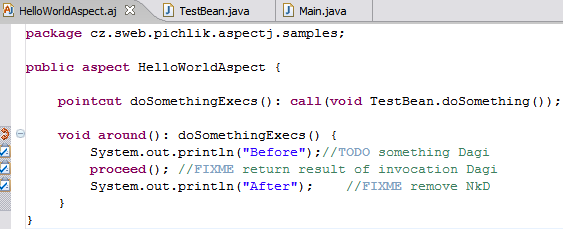
Eclipse normally shows any comment containing TODO, FIXME or XXX in the Tasks view (Window >> Show View >> Other >> General >> Tasks).
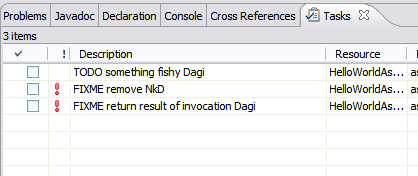
As you can see in the screenshot, the Tasks view shows everything by default. Let’s create a filter that shows only our tasks.
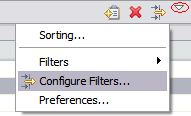
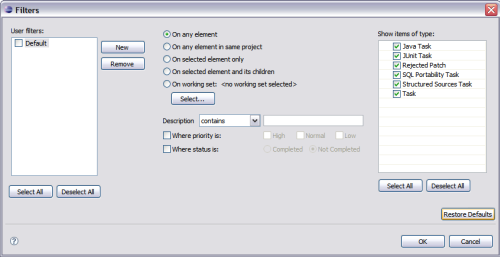
(Full size, about 30 KB)
Create a new filter with New. Set the scope to On any element in same project (or On any element). Under Description contains, enter your tag, for example Dagi. Check the filter on the left to make the view use it by default.
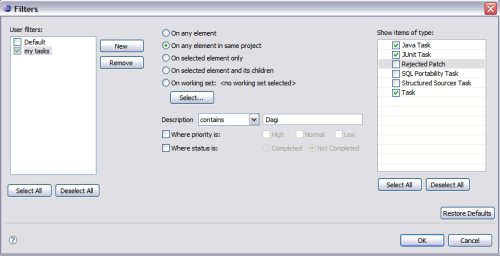
(Full size, about 30 KB)
You can define and apply as many filters as you like. The next screenshot shows the result of the filter we defined.
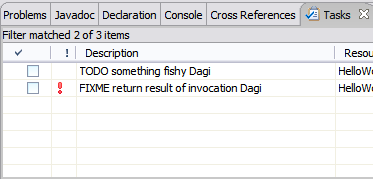
Related articles
Related articles
Related CZ Podcast episodes
- #3 · Java 6 SE, Vývoj webových aplikací
Dagi and Filemon discuss Java 6 and web application frameworks. · Czech audio
- #1 · Vývojová prostředí v Javě
The first CZ Podcast episode looks at Java development environments. · Czech audio