Eclipse tips: JUnit support
The Eclipse development environment has built-in support for the unit testing framework
JUnit. It offers several useful features that make unit tests easier to create, run and evaluate.
Creating a test class
Eclipse makes it easier to create test classes with
a simple wizard. Right-click the class you want to create a test
for and choose New >> JUnit Test Case to open the wizard.
Opening the wizard
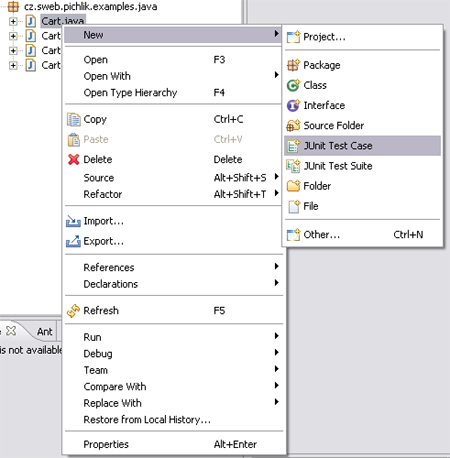
If JUnit Test Case is missing from the New menu, you can enable it
under Window >> Customize Perspective >> Shortcuts tab >> Submenus: New >> expand Java and check JUnit.
The wizard
The first page of the wizard offers basic options based on JUnit’s features. For example, you can generate the setUp and tearDown methods or configure the test runner.
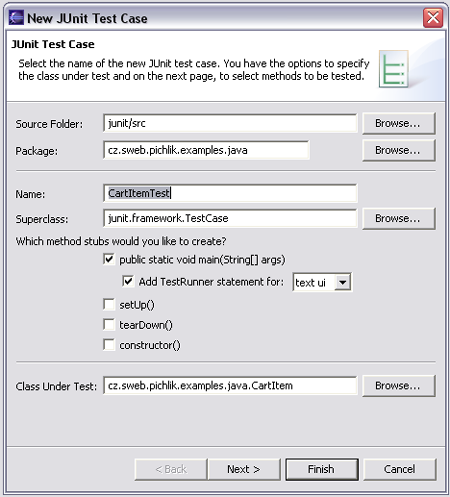
Click Next to go to the page where you can select which methods of the class to test. The wizard generates test stubs for those methods.
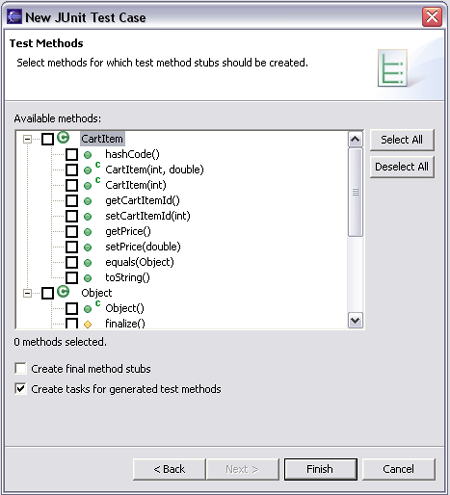
Creating a Test Suite
Eclipse helps you create a Test Suite just as it does a test class. Open the Test Suite wizard the same way: New >> JUnit Test Suite. All the test classes in the package are automatically added to the suite.
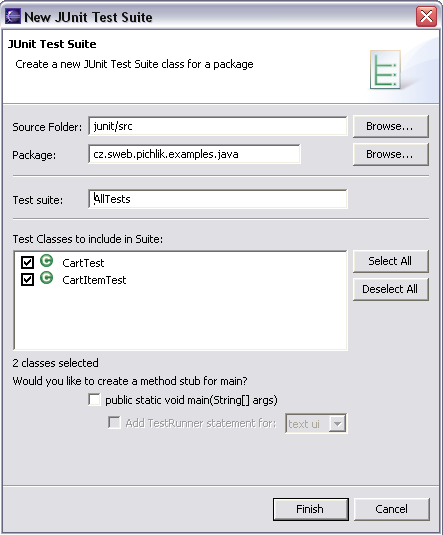
JUnit view
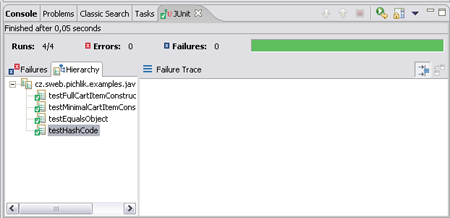
The JUnit view gives you a graphical interface for watching test results and inspecting failures. If the JUnit view isn’t in your perspective, enable it via Window >> Show View >> Other >> Java >> JUnit.
Running tests
The test launch interface is another feature that makes tests easier to work with. Right-click the test class and choose Run >> JUnit Test. You can also use Run >> Run As >> JUnit Test. The JUnit view displays the progress graphically.
Related articles
Medium version · Archived original page · Screenshots: Roman Pichlík, CC BY 3.0 · Historical Sweb link
Related articles
Related CZ Podcast episodes
- #261 · Leadership
On leading people and teams. · Czech audio
- #3 · Java 6 SE, Vývoj webových aplikací
Dagi and Filemon discuss Java 6 and web application frameworks. · Czech audio
- #1 · Vývojová prostředí v Javě
The first CZ Podcast episode looks at Java development environments. · Czech audio