Luntclipse — Luntbuild Eclipse Plugin
News
19.9.2005 — Luntclipse 0.0.2 released (see changes)
Description
Luntclipse is Eclipse plugin that provides functionality for
working with builds. It is possible to watch status of any build or
trigger a build in any build schedule. Luntclipse communicates
with Luntbuild through Hessian web service protocol and HTTP (log detail). Luntclipse possibilities are limited by range of APIs exported by Luntbuild.
Feature List
- watch build information (similar to Luntbuild home page)
- trigger build
- display detail of build log
- display detail of revision log
Install/Usage
- download Luntclipse 0.0.2
- If you are currently using a previous version of Luntclipse, you must first uninstall the previous version.
- Unzip contents of the zip file to the Eclipse “plugins” directory and restart Eclipse.
- Configure preferences for the plug-in, go to Window > Preferences > Luntclipse. Change
luntbuild URL eventually user or password. - From the Window/Show View menu, choose Other -> Luntclipse -> Luntbuild to open the view
Changes
Changes since version 0.0.1
- fix the bug com.caucho.hessian.io.HessianProtocolException: unknown code:
- fix the bug Unhalted event loop exception
TODO List
- customizable highlighting in log detail (Now is highlighted each line matching with regexp .*[junit].*)
Screenshots
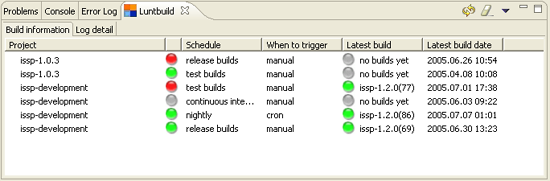
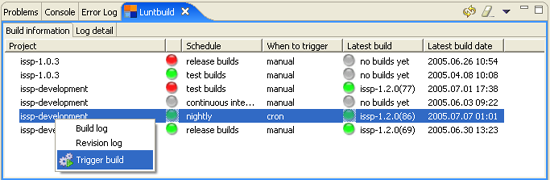
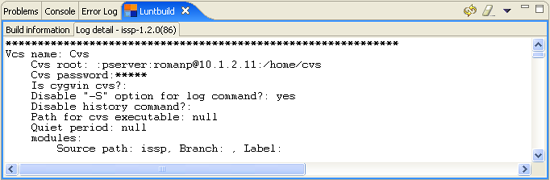
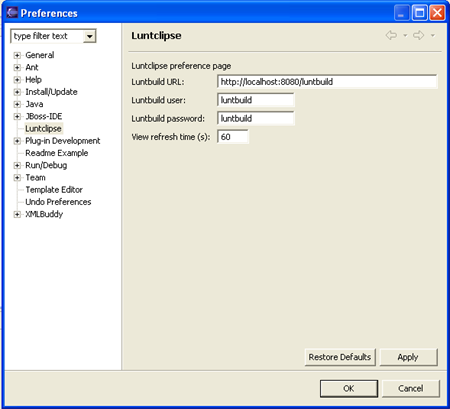
Related articles
Related CZ Podcast episodes
- #3 · Java 6 SE, Vývoj webových aplikací
Dagi and Filemon discuss Java 6 and web application frameworks. · Czech audio
- #1 · Vývojová prostředí v Javě
The first CZ Podcast episode looks at Java development environments. · Czech audio