The Template Method pattern and its use in JDBC
This article could just as easily be subtitled “Working efficiently with databases in Java: Stop writing redundant code.” People often discuss how to work with JDBC, Java's interface to databases. They talk less often about how to write JDBC code efficiently. I'll show how to do it with the Template Method design pattern.
Accessing a database in Java isn't difficult, and everything you need is defined by the JDBC (Java Database Connectivity) interface. Working with it involves several steps.
- get a database connection
- create a statement
- set its parameters and execute the SQL
- iterate over the result set and process the data
- close the result set, the statement and the database connection
Typical code looks like this.
Connection con = null;
PreparedStatement ps = null;
ResultSet rs = null;
try{
con = getConnection();
ps = con.prepareStatement(“select * from foo”);
rs = ps.executeQuery();
while(rs.next()){
//zpracuj hodnoty
}
}finally{
rs.close();
ps.close();
con.close();
}
All these steps recur for every SQL query except processing the returned data. That leaves a lot of redundant code. We also have to handle the ubiquitous SQLException, which is both too general and a checked exception. Because the code is redundant, we tend to fall back on the tried-and-true method of finding it and pasting it.
That makes it easy to introduce a bug that's hard to track down later. A classic example is failing to close a database connection or return it to the pool. And who wouldn't want to stop copying code over and over? The way to deal with redundancy, exception handling and responsibility is to separate out the common code, using the Template Method pattern.
Template Method
Template Method is a behavioral design pattern. The idea is that a more abstract superclass defines a sequence of steps in one method by calling several polymorphic methods. Subclasses override the polymorphic operations and call the template method to run that sequence.
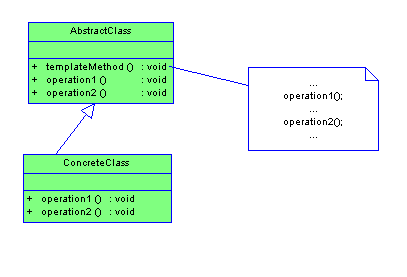
The templateMethod method defines the outline. Among other things it calls operation1 and operation2. They're declared abstract in the superclass, and a subclass can give them empty implementations. A subclass implements these methods to fill in the remaining parts of the sequence. To run it, call new ConcreteClass().templateMethod();.
Applied to our problem, the common code goes in the superclass. It gets the database connection, creates the statement, sets parameters, executes the SQL, iterates over the result set and closes everything it needs to. The superclass defines two abstract methods, one for getting the database connection and the other for processing a result-set row.
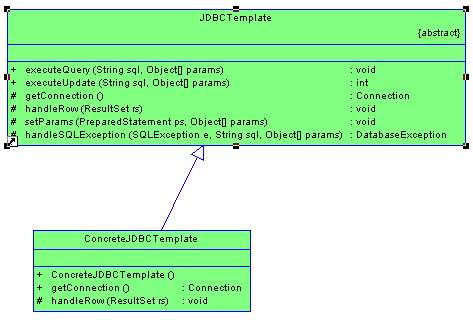
About the diagram
The links point to the generated Javadoc, which is linked to the source code. It gives a detailed description of each method's interface.
The JDBCTemplate object defines two template methods for callers: executeQuery and executeUpdate. It also defines two polymorphic methods, getConnection and handleRow. Subclasses can also override setParams and handleSQLException. The class diagram shows the subclass ConcreteJDBCTemplate, which obtains the database connection and implements handleRow with an empty body. It's a good starting point for more specialized classes. For example, you could create a class that returns the query result as a list whose rows are maps keyed by column name.
JDBCTemplate source code
package cz.sweb.pichlik.jdbctemplate;
import java.io.IOException;
import java.io.InputStream;
import java.math.BigDecimal;
import java.sql.Connection;
import java.sql.Date;
import java.sql.PreparedStatement;
import java.sql.ResultSet;
import java.sql.SQLException;
import java.sql.Timestamp;
/**
* Abstraktní předek pro JDBC operace (podporuje select, insert, update a delete), který
* umožňuje efektivně pracovat resultset. Díky tomu se nekontaminuje klientský kód
* často se opakujícím JDBC kódem a nemusí se explicitně starat o zpracování
* {@link java.sql.SQLException}.
*
* Potomkové musí přepsat metodu {@link #handleRow(ResultSet)} pokud
* chtějí zpracovat resultset (platí pro select) a {@link #getConnection()},
* kterou budou poskytovat databázové připojení.
*
* @author Roman “Dagi” Pichlík
*/
public abstract class JDBCTemplate {
/**
* Konstanta označující SQL příkaz select
*/
private static final int SELECT_QUERY = 0;
/**
* Konstanta označující insert, update, delete
*/
private static final int UPDATE_QUERY = 1;
/**
* Provede select SQL příkaz. Přes výsledný resultset se prochází a každý
* řádek se předává k zpracování metodě {@link #handleRow(ResultSet)}.
* V případě, že vznikne {@link SQLException} je předána k zpracování metodě
* {@link #handleSQLException(SQLException, String, Object[])}
*
* @param sql SQL příkaz (nesmí být null)
* @param params parametry pro SQL (může být null)
*
* @throws NullPointerException pokud je SQL null
*
* @see #setParams(PreparedStatement, Object[])
*/
public final void executeQuery(String sql, Object params[]) {
try{
executeQueryInternal(sql, params, SELECT_QUERY);
}catch(SQLException e){
throw handleSQLException(e, sql, params);
}
}
/**
* Provede SQL příkaz typu insert, update, delete a vrátí počet
* modifikovaných řádek. V případě, že vznikne {@link SQLException} je předána k zpracování metodě
* {@link #handleSQLException(SQLException, String, Object[])}.
*
* @param sql SQL příkaz (nesmí být null)
* @param params parametry pro SQL (může být null)
*
* @return počet modifikovaných řádek
*
* @throws NullPointerException pokud je SQL null
*/
public final int executeUpdate(String sql, Object params[]) {
try{
return executeQueryInternal(sql, params, UPDATE_QUERY);
}catch(SQLException e){
throw handleSQLException(e, sql, params);
}
}
/**
* Realizuje vlastní vykonání příkazu
* @param sql SQL příkaz
* @param params parametr
* @param queryType typ SQL (insert, select, update ,delete)
*
* @return rows affected
*
* @throws SQLException v případě, že nějaká vznikne
*/
private int executeQueryInternal(String sql, Object params[], int queryType) throws SQLException{
if(sql == null){
throw new NullPointerException();
}
int rowsAffected = -1;
Connection con = null;
PreparedStatement ps = null;
ResultSet rs = null;
try{
con = getConnection();
ps = con.prepareStatement(sql);
if(params != null){
setParams(ps, params);
}
if(queryType == SELECT_QUERY){
rs = ps.executeQuery();
while(rs.next()){
handleRow(rs);
}
}else{
rowsAffected = ps.executeUpdate();
}
}finally{
close(con, ps, rs);
}
return rowsAffected;
}
/**
* Vrací databázové připojení, které se použije pro vykonání SQL příkazu.
*
* @return databázové připojení
*/
protected abstract Connection getConnection() throws SQLException;
/**
* Metoda, ve které se implementuje vlastní zpracování řádku resultsetu.
*
* @param rs resultset
* @throws SQLException v případě, že nějaká vznikne
*/
protected abstract void handleRow(ResultSet rs) throws SQLException;
/**
* Slouží k nastavení parametrů pro SQL příkaz podle pořadí. Nastavení hodnot
* null není podporováno.
*
*
Supported data types
*
{@link BigDecimal}{@link Date}{@link String}{@link InputStream}{@link Timestamp}{@link java.lang.Double}{@link java.lang.Float}{@link Integer}{@link Long}
*
* @param ps statement
* @param params parametry
* @throws SQLException v případě, že nějaká vznikne
* @throws UnsupportedOperationException pokud se jedná o parametr mimo podporované
* datové typy.
*/
protected void setParams(PreparedStatement ps, Object params[]) throws SQLException{
Object paramValue = null;
for (int i = 0; i < params.length;) {
paramValue = params[i];
if(paramValue == null){
throw new UnsupportedOperationException(“Nastavení hodnoty null není podporováno”);
} else if(paramValue instanceof BigDecimal){
ps.setBigDecimal(++i, (BigDecimal)paramValue);
}else if (paramValue instanceof Date){
ps.setDate(++i,(Date)paramValue);
}else if (paramValue instanceof InputStream){
try{
InputStream is = (InputStream) paramValue;
ps.setBinaryStream(++i,is, is.available());
}catch(IOException e){
throw new RuntimeException(e);
}
}else if (paramValue instanceof String){
ps.setString(++i, (String) paramValue);
}else if (paramValue instanceof Timestamp){
ps.setTimestamp(++i, (Timestamp)paramValue);
}else if (paramValue instanceof Double){
ps.setDouble(++i, ((Double)paramValue).doubleValue());
}else if (paramValue instanceof Float){
ps.setFloat(++i, ((Float)paramValue).floatValue());
}else if (paramValue instanceof Integer){
ps.setInt(++i, ((Integer)paramValue).intValue());
}else if (paramValue instanceof Long){
ps.setLong(++i, ((Long)paramValue).longValue());
}else {
throw new UnsupportedOperationException(“Podpora datového typu “ + paramValue.getClass() + “ není prozatím implementována!”);
}
}
}
/**
* Umožňuje ošetřit vzniklou {@link SQLException}. Defaultně je
* implementována tak, že vzniklá výjimka je obalena do {@link DatabaseException}.
* Potomkové mohou toto chování libovolně přepsat např. výjimku zapsat do logu,
* lokalizovat text výjímky apod.
*
* @param e vzniklá výjimka
* @param sql SQL příkaz, při kterém vznikla výjímka
* @param params parametry pro SQL
*/
protected DatabaseException handleSQLException(SQLException e, String sql, Object params[]){
String message = "Vznikla neočekávaná chyba během databázové operace!";
return new DatabaseException(message, e, sql, params);
}
/**
* Provede bezpečné uzavření statemntu, resultsetu a databázového připojení.
* @param con databázové připojení
* @param ps statemnt
* @param rs resultset
* @throws SQLException v případě, že nějaká vznikne
*/
private void close(Connection con, PreparedStatement ps, ResultSet rs) throws SQLException {
try{
if(rs != null){
rs.close();
}
}finally{
try{
if(ps != null){
ps.close();
}
}finally{
if(con != null){
con.close();
}
}
}
}
}
Example usage
As I mentioned earlier, ConcreteJDBCTemplate is a good candidate for extension. For this example it creates a new database connection from system properties for each request. In production, you'd want to pool connections. The following code comes from ExampleTemplate. Notice that it extends ConcreteJDBCTemplate through an anonymous inner class.
/**
* Smazání řádků z tabulky
*/
public void delete(){
String deleteQuery = “delete from test”;
int rowsAffected =
new ConcreteJDBCTemplate().executeUpdate(deleteQuery, null);
System.out.println(“Rows deleted:” + rowsAffected);
}
/**
* Vložení řádků o tabulky
*/
public void insert(){
Object params[] = {new Integer(1), new Integer(1), new Double(0.1), new Timestamp(new Date().getTime()), “Foo”};
String insertQuery = “insert into test (id, _integer, _double, _timestamp, _string) values (?, ?, ?, ?, ?)”;
int rowsAffected =
new ConcreteJDBCTemplate().executeUpdate(insertQuery, params);
System.out.println(“Rows inserted:” + rowsAffected);
}
/**
* Update řádků z tabulky
*/
public void update(){
String updateQuery = “update test set _integer = ?, _double = ?, _timestamp = ?, _string = ?”;
Object params[] = {new Integer(2), new Double(0.2), new Timestamp(new Date().getTime()), “Hoo”};
int rowsAffected =
new ConcreteJDBCTemplate().executeUpdate(updateQuery, params);
System.out.println(“Rows updated:” + rowsAffected);
}
/**
* Vypsání výsledků SQL příkazu na konzoli
*/
public void select(){
String sql = “select * from test”;
new ConcreteJDBCTemplate(){
protected void handleRow(ResultSet rs) throws SQLException {
Integer id = Integer.valueOf(rs.getInt(“id”));
Integer _integer = Integer.valueOf(rs.getInt(“_integer”));
Double _double = Double.valueOf(rs.getDouble(“_double”));
Timestamp _timestamp = rs.getTimestamp(“_timestamp”);
String _string = rs.getString(“_string”);
…
}
}.executeQuery(sql, null);
}
The examples use a database created by the included SQL script (MySQL syntax). To run the examples, create the test table. Then use the prepared batch file, adjusting it for your local environment and JDBC driver, which you must download for your database. The source code for the classes is also available.
Sources
- Ilja Kraval — electronic publication Design Patterns in OOP
The source code was converted with the online version of the open-source program Java2Html (Open source Java (and others) to (X)HTML (and TeX and RTF) converter).
Related articles
Related CZ Podcast episodes
- #3 · Java 6 SE, Vývoj webových aplikací
Dagi and Filemon discuss Java 6 and web application frameworks. · Czech audio
- #1 · Vývojová prostředí v Javě
The first CZ Podcast episode looks at Java development environments. · Czech audio