The order of events in browsers
I’d like to share something interesting. I’m building the web presentation layer of a three-tier application and ran into a browser event problem.
I needed a popup calendar in HTML and JavaScript. Here’s how I want it to work: there’s a little button on the page. Clicking it
opens an absolutely positioned DIV with a calendar. It stays visible while the pointer is
over the calendar or its button.
So I call a JavaScript function on the onmouseout event of both elements to hide the calendar DIV. It would work beautifully if the
DIV in question didn’t contain other elements, such as a month picker button and the individual days.
An example shows this best:
<!DOCTYPE HTML PUBLIC "-//W3C//DTD HTML 4.01 Transitional//EN">
<html>
<head><script language="JavaScript">
var logID = 0;
function addLog(message) {
var log = document.getElementById("console");
logID++;
log.value = log.value + logID + " : " + message + "\n"
}
function clearLog(){
var log = document.getElementById("console");
log.value = "";
logID = 0;
}
</script></head>
<body style="margin:20px 20px 20px 20px;">
<div id="outter" align="center" style="border:1px solid black;
background-color:#AAAAff;width:100px;height:100px"
onmouseover="addLog('outer DIV - mouse over');"
onmouseout="addLog('outer DIV - mouse out');">
Outer DIV
<br /><br />
<div style="border:1px solid black;
background-color:#AAFFAA;width:50px;height:50px;margin:auto;"
onmouseover="addLog('inner DIV - mouse over');"
onmouseout="addLog('inner DIV - mouse out');">
Inner DIV
</div>
</div>
<br />
<input onclick="clearLog();" type="button" value="clear LOG" />
<br />
<textarea id="console"
style="width:500px;height:300px;"></textarea>
</body>
</html>Illustration
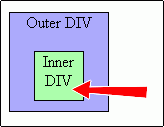
Now let’s go through the events triggered when we move the mouse along the
red arrow in the picture:
1 : outer DIV - mouse over
2 : outer DIV - mouse out
3 : inner DIV - mouse over
4 : outer DIV - mouse over
Events 2 and 4 are surprising. Event 2 in particular prevents us from hiding outterDiv on its onmouseout event.
I originally assumed that outer mouse over and outer mouse out would fire only when
the mouse entered or left that DIV and that its children or nested elements would never trigger those events
on their parent. I’ve found two solutions so far.
First solution
//JavaScript
var mysNadDiv = false;
var delayCallID = 0;
function delayCall(funcCall, delay){
  clearTimeout(delayCallID);
  delayCallID = setTimeout(funcCall,delay);
}
function hideDiv(){
 if (!mysNadDiv) {
  document.getElementById('outter').style.display="none";
 }
}
//do html k outter divu
onmouseover="mysNadDiv=true;"
onmouseout="mysNadDiv=false;delayCall('hideDiv();',200);"Essentially, event 2 schedules a delayed JavaScript call. Before hideDiv actually runs,
event 4 can use the ‘mysNadDiv’ variable to prevent hiding. The outer DIV ends up hidden only once the mouse actually leaves it.
The JavaScript function uses clearTimeout to avoid piling up timers if the mouse moves back and forth quickly.
Second solution
Track the mouse position and forget about events. Hide the outer DIV only when the coordinates
leave the area it defines.
If anyone knows a better solution, let’s hear it. I should add that there could easily be 100 inner DIVs, each with
more nested elements, and your solution still has to work with as little extra code as possible.
Related articles
Related CZ Podcast episodes
- #217 · Ivo Lukačovič
On Windy, JavaScript and building companies. · Czech audio
- #3 · Java 6 SE, Vývoj webových aplikací
Dagi and Filemon discuss Java 6 and web application frameworks. · Czech audio