Getting to know the DOM II — document structure and the object model
Last time we briefly introduced the DOM specification and its basic idea.
In this installment we'll look at the structure of the document itself. Understanding its structure
and abstracting it into a structural model and an object model will help complete the overall picture of the
DOM specification.
From the DOM's point of view, we can think of a document as a logical structure
of nodes, like a branching tree. The specification itself doesn't require an implementation to
use a tree for that logical structure and doesn't say how to implement the relationships between nodes. Still,
we'll use the specification's term “structural model” to describe
the tree representation of the document.
Let's stay with the specification a little longer and use a piece of HTML
to show what its DOM representation looks like.
- foo
- hoo
- bar
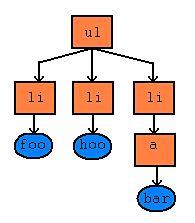
Notice the absence of the href attribute. In an XML tree, the attribute would appear as one node and its
content as a second one. In the DOM's document structure, however, attributes
aren't treated as additional nodes of the document.
Attentive readers will have noticed that we've mentioned documents and models. The third member
of the group is the object. Objects let us model the document's structure as well as
the behavior of the whole document or its parts. The individual nodes are objects that encapsulate
behavior and internal state. That's why the attributes are absent from the previous model: they represent
or describe the object's internal representation.
Representing the document through objects is called the object model. The DOM
defines it through the following things.
- the set of interfaces and objects used to represent and manipulate a document
- the semantics, behavior and properties of those interfaces and objects
- the relationships and interactions between those interfaces and objects
That's all for today. Next time we'll look at how the DOM is divided
into modules, and we'll cover the basic DOM Core and DOM HTML modules. After that we can move from theory
to practical uses of the DOM.
Related articles
- (Dagblog 4.1.2004) Getting to know the DOM I
- (Dagblog 5.1.2004) Getting to know the DOM II — document structure and the object model
- (Dagblog 12.1.2004) Getting to know the DOM III — modules and levels
- (Dagblog 29.1.2004) Getting to know the DOM IV — traversing the document
- (Dagblog 24.2.2004) Getting to know the DOM V — traversing the document, part II
Related articles
Related CZ Podcast episodes
- #217 · Ivo Lukačovič
On Windy, JavaScript and building companies. · Czech audio
- #3 · Java 6 SE, Vývoj webových aplikací
Dagi and Filemon discuss Java 6 and web application frameworks. · Czech audio