Getting to know the DOM III — modules and levels
In this installment of the DOM series, we'll look at how
the specification is divided into modules. We'll also discuss the different
levels of the specification and what they do.
Already in the first design of the DOM specification, it was clear that the
model had to let the specification grow. There was also the question of how to handle the work of implementing it
alongside the complexity of the specification itself. A reasonable solution was to split the different
parts into modules. Besides the required Core module, each implementation could choose
the other modules it needed for its purposes. Web browsers could use the events module, for example, while a server-side
implementation could skip it because it would hardly be useful there.
A DOM implementation can implement one module (always Core) or several,
depending on its use. The illustration below shows the DOM modules
by name, including the ones defined in
Document Object Model (DOM) Level 3, which at the time of writing
has the status of a W3C Candidate Recommendation.
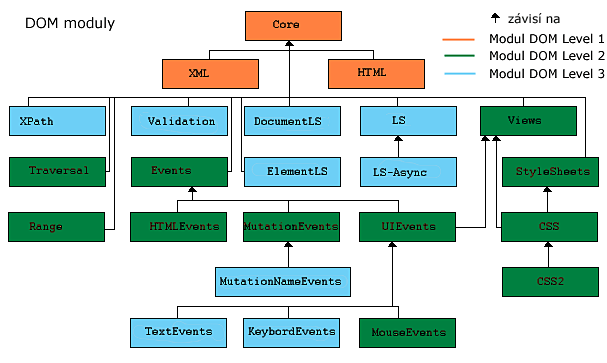
The first DOM specification (Level 1) introduced Core, a set of basic interfaces,
which the XML and HTML modules extended. The next revision of the specification (Level 2)
expanded Core slightly, established it as a module, and added entirely new modules: Views, StyleSheets, CSS,
CSS2, Events, UIEvents, MouseEvents, MutationEvents,
HTMLEvents, Range and Traversal. The latest specification so far (Level 3) introduced
TextEvents, KeyboardEvents, MutationNameEvents, LS, LS-Async, DocumentLS,
ElementLS, Validation and XPath.
The basic interfaces that made up the Core module in Level 2 specify the
DOMImplementation
interface with the method hasFeature(feature, version).
This method lets you check whether a DOM module (feature) is implemented for a particular version (version). DOMImplementation
can be accessed through the implementation interface's Document attribute. See Document.implementation.
You can easily test whether a module at a particular level is implemented. Here's an example in JavaScript.
isHtmlModul = document.implementation.hasFeature("HTML","1.0");The first argument is always the module name, and the second gives the version (1.0, 2.0 or 3.0). The return value
is true|false, meaning implemented or not implemented, respectively. To find out which modules your browser supports,
use the DOM module implementation test page.
That's all for this installment. Next time we'll leave the theory behind and look at specific examples
of using the DOM. We'll start with the Core module and cover the Document interface and
methods for traversing a document.
Related articles
- (Dagblog 4.1.2004) Getting to know the DOM I
- (Dagblog 5.1.2004) Getting to know the DOM II — document structure and the object model
- (Dagblog 12.1.2004) Getting to know the DOM III — modules and levels
- (Dagblog 29.1.2004) Getting to know the DOM IV — traversing the document
- (Dagblog 24.2.2004) Getting to know the DOM V — traversing the document, part II
Related articles
Related CZ Podcast episodes
- #217 · Ivo Lukačovič
On Windy, JavaScript and building companies. · Czech audio
- #3 · Java 6 SE, Vývoj webových aplikací
Dagi and Filemon discuss Java 6 and web application frameworks. · Czech audio