Getting to know the DOM V — traversing the document
In the previous part we looked at basic methods for retrieving a part of a document. In this installment we'll look at the Node interface, which offers a useful set of methods and attributes for traversing a document. Working with a document through this interface is quite simple if you think of the document as a tree of connected nodes.
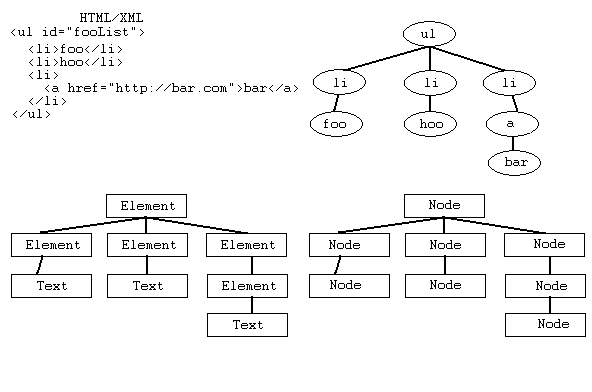
Interface Node
Attribute childNodes
A NodeList collection that contains all the child nodes. A simple example will help us list them.
<ul id="fooList"> <li>foo</li> <li>hoo</li> <li><a href="http://bar.com">bar</a></li> </ul>. . . function printChild(){ ulElement = document.getElementById("fooList"); childNodes = ulElement.childNodes; for(foo = 0; foo < childNodes.length; foo++){ document.write(childNodes[foo]); } document.writeln("Počet dětí:" + foo); }
Depending on your browser, you’ll see a certain number of objects, or children, displayed. Now let’s try the same example with the same elements, but without a line break between them.
<ul id=“fooList”><li>foo</li><li>hoo</li>…
Attribute firstChild
The first child of the current node. If there is none, the value is null.
Attribute lastChild
The last child of the current node. If there is none, the value is null.
Attribute previousSibling
The immediately preceding sibling of the current node. If there is none, the value is null.
Attribute nextSibling
The immediately following sibling of the current node. If there is none, the value is null.
Attribute parentNode
The parent of this node. All nodes except Attr, Document, DocumentFragment, Entity and Notation can have a parent. If there isn’t one, the value is null.
Attribute attributes
A NamedNodeMap collection containing this node’s attributes if the node is an Element or null otherwise.
Attribute nodeName
The name of the node, which depends on its type.
Attribute nodeValue
The value of the node, which depends on its type.
Attribute nodeType
A code representing this type of node.
The values of the last four attributes depend on the node type. To clarify, it’s important to understand that Node is just the base interface that every node in the document implements, as the diagram shows. All nodes also implement a further interface that specifies their nature more closely. For example, HTML document nodes implement Element or an interface derived from it. That more specific interface determines the node type. For a node that also implements Element, the nodeName attribute holds the tag name and nodeValue holds null. If the node implements the Text interface, nodeValue holds the constant #text, and nodeValue holds the actual text of the node.
Values of the nodeName, nodeValue and attributes attributes by interface type
| Interface | nodeName | nodeValue | attributes |
|---|---|---|---|
| Attr | name of attribute | value of attribute | null |
| CDATASection | #cdata-section | content of the CDATA Section | null |
| Comment | #comment | content of the comment | null |
| Document | #document | null | null |
| DocumentFragment | #document-fragment | null | null |
| DocumentType | document type name | null | null |
| Element | tag name | null | NamedNodeMap |
| Entity | entity name | null | null |
| EntityReference | name of entity referenced | null | null |
| Notation | notation name | null | null |
| ProcessingInstruction | target | entire content excluding the target | null |
| Text | #text | content of the text node | null |
The list of attributes and methods on the Node interface goes well beyond what we need for this article. For more, see the specification. I’m also including a simple example of firstChild, lastChild, previousSibling, nextSibling and parentNode.
Related articles
- (Dagblog 4.1.2004) Getting to know the DOM I
- (Dagblog 5.1.2004) Getting to know the DOM II — document structure and the object model
- (Dagblog 12.1.2004) Getting to know the DOM III — modules and levels
- (Dagblog 29.1.2004) Getting to know the DOM IV — traversing the document
- (Dagblog 24.2.2004) Getting to know the DOM V — traversing the document, part II
Medium version · Archived original page
Related articles
Related CZ Podcast episodes
- #217 · Ivo Lukačovič
On Windy, JavaScript and building companies. · Czech audio
- #3 · Java 6 SE, Vývoj webových aplikací
Dagi and Filemon discuss Java 6 and web application frameworks. · Czech audio