Three-tier architecture in a nutshell, part I
Introduction
Whether we notice it or not, we encounter products built according to a modern model for business
applications, also called three-tier architecture, at every turn.
Don't believe me? Ask yourself whether you've ever used an online shop,
booked a hotel, a flight or other accommodation online, or used the services of a
news portal. If the answer is yes, you have almost certainly
encountered three-tier architecture, sometimes also known as multi-tier
architecture.
Why three tiers instead of two?
The three-tier model evolved directly from two-tier architecture, a model
whose design now looks dated. Two-tier architecture consists of
a client tier and a data tier, as the next illustration shows.
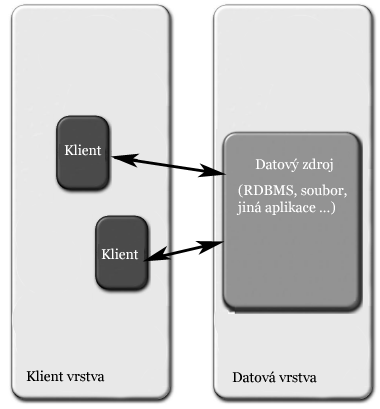
The client contains most of the application logic and uses it directly against the data
source. In many cases the data source is a relational database and the client
uses SQL to work with the data. Other data sources include files
or other applications, such as information systems.
The drawbacks of this model emerged as client applications grew more
complex. One factor was that more complex applications demanded more computing power
from the client computers. Others stemmed directly from applications becoming widespread.
Software companies had to respond quickly to demand and try to meet
customers' wishes promptly. These business processes led to requirements for future applications,
such as sharing resources and limiting data transfer, which prompted people
to look for an architecture that could meet them.
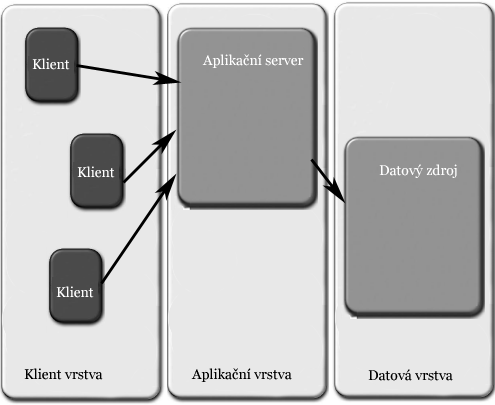
The solution was to add a third tier, the middle tier. Of course,
adding a tier wasn't enough. The different tiers and their roles had to be
defined. The next illustration shows the three-tier architecture.
New roles for familiar tiers
Moving to three-tier architecture changed what the individual tiers did.
The clearest change was at the client tier. The newly defined application
tier made it possible to move the logic that had been on the client to
an application server. This took a large load off the clients by moving the
computational work to powerful servers.
Putting the application logic in one place made it possible to share it
and improve its management and availability. The application tier, represented by the application server, could offer
services such as load balancing and failover. It became possible to cut
data transfer considerably, with most of it now occurring between the application
server and the data source. Those two could be linked by
an appropriate network connection. Cutting data transfer directly improved
client response times and allowed clients to connect over slower links.
Thin and thick clients
These stripped-down clients may have been what led people to call them thin clients.
More generally, the client tier was defined as a tier intended
only to present data to the user. A thin client is therefore one that contains no
application logic. An application server provides that logic,
and the thin client accesses it there. A thick client, simply called the client
in the two-tier model, contains most of the application logic. In practice even a thin client needs
some application logic, but the share is negligible
compared with a thick client's.
What about the web browser?
Under that definition, the web browser falls into the thin-client category. I
personally distinguish between a browser and a thin client. A standards-based
browser uses HTML and CSS to describe its graphical user interface
(GUI). Together, HTML and CSS don't offer the same ability as other thin
clients to describe more complex interfaces. Another drawback of browsers is
being tied to HTTP's request-response model.
These differences lead me to distinguish web browsers from thin clients
in the context of three-tier architecture. A common mistake is to distinguish thin
and thick clients according to whether they're web browsers. I'd point out
that whether you're ultimately using a browser is secondary. The deciding factor is
where the application logic sits.
The data tier
The data tier, also known as the backend, did not change in the three-tier model.
It serves as the data source, regardless of whether it's backed by a relational
database, a file
system, a web service or another application.
The application tier
As mentioned a few paragraphs above, the application tier essentially
provides a home for the application logic. That logic is responsible for accessing and manipulating
data and exposing it in a suitable format, such as XML or HTML, for the client tier.
Historically, the application tier has changed the most. One of the simplest
ways to implement it is a web server with a CGI
interface, which was used to call routines implemented as executables and later
as server-side scripts.
The complexity of the application tier led to its further division into layers.
That made it possible to define each layer's responsibilities within the application
tier. The layers are presentation, business and
persistence. Technologies or patterns such as MVC (Model–View–
Controller) and ORM sit at the boundaries between them. More about that in the next installment, if there's interest.
Related articles
Related CZ Podcast episodes
- #261 · Leadership
On leading people and teams. · Czech audio
- #217 · Ivo Lukačovič
On Windy, JavaScript and building companies. · Czech audio
- #3 · Java 6 SE, Vývoj webových aplikací
Dagi and Filemon discuss Java 6 and web application frameworks. · Czech audio