Java Web Frameworks
I could also have called this article “Following MVC,” or “The bare minimum you need to avoid mistakes when building Java web applications.” Let’s start with the big picture. Java isn’t .NET, so you have an enormous choice of frameworks for building web applications. All the frameworks I know and will discuss have one thing in common: an architecture built on the MVC design pattern. If you already know MVC, feel free to skip the next section.
From spaghetti code to MVC
When Java Server Pages (JSP, (1)) first appeared, it looked much like PHP or ASP and let people use Java on the web to generate pages dynamically. At its heart was the scriptlet (delimited by <% %>), which let you use Java directly to generate HTML. That would have been fine if developers hadn’t started putting the entire application’s code straight into JSP pages. The result looked something like this.
<%
 Connection con = null;
 String sql = "select name from users";
 PreparedStatement ps =  con.prepareStatement(sql);
 ResultSet rs = ps.executeQuery();
 out.println("<table>");
 while(rs.next()) {
     out.println("<tr>");
       out.println("<td>");
         out.println(rs.getString(1));
       out.println("</td>");
     out.println("</tr>");
 }
 out.println("<table>");
%>
That code had problems on several levels. It mixed presentation and application logic. The code that did the business work was tangled up with the code that displayed the results. Code written this way was difficult or impossible to reuse on another page, and you couldn’t test it. It was a tangled ball of spaghetti.
The next step was the addition of custom tags in JSP 1.1, which could be grouped into tag libraries. A tag has two parts: markup similar to an HTML element, and the corresponding Java class (2). That lets you encapsulate Java code for reuse, whether to generate dynamic content or to call application logic.
Following JSP 1.1, the first web frameworks built around the Model View Controller (MVC) design pattern began to appear around 2000. Probably the best-known framework in that wave, which became the de facto standard, was Struts.
The MVC pattern separates application logic from presentation. This is useful in desktop applications (3)as well as web applications.
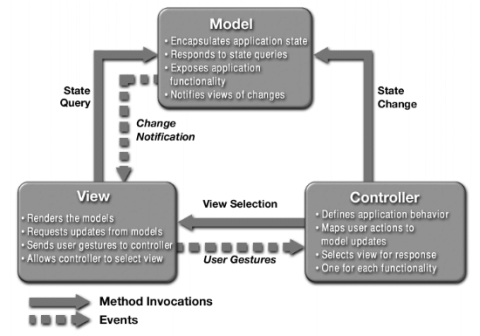
MVC has three parts: Model, View and Controller. Each has a specific, well-defined role.
Controller
mediates between Model and View.
Model
represents the entities, or data, that the View works with.
View
transforms the Model into a form suitable for presentation.
Separating the roles gives each part its own responsibility and prevents them from getting mixed together. The parts aren’t tightly coupled. A Model provided by independent application logic can be used unchanged in any number of Views. The following diagram illustrates one possible implementation of MVC with JSP and servlets.
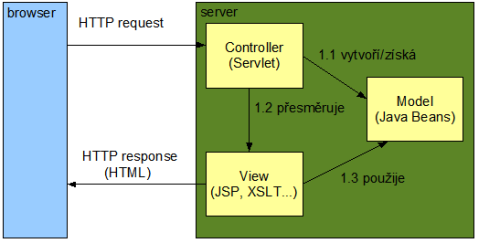
The incoming request is delegated to a servlet that acts as the Controller. The servlet calls the application logic, gets the Model (4) and makes it available in a scope the JSP can see, for example as a request attribute. It then forwards to the JSP, which retrieves the data (the Model) from that scope and displays it.
How web frameworks are architected today
The following isn’t essential to choosing a web framework. It’s just a look under the hood. If you’re not interested in the differences among enterprise design patterns, feel free to skip this section.
There are several ways to implement MVC on the web. Today the two main approaches (5)correspond to these design patterns:
Struts 1 and 2 and Spring MVC are classic implementations of Front Controller. Implementations of JSF and extensions to it, such as Shale and Seam, are built on Dispatcher View.
From the application’s point of view, the difference between a framework built on Front Controller and one built on Dispatcher View is when the application logic is called. With Front Controller, it’s called before control passes to the View. With Dispatcher View, it’s called indirectly from within the View. See the View Helperdesign pattern.
The following sequence diagram shows the difference. I’ve replaced Front Controller with the more specialized Service To Worker.
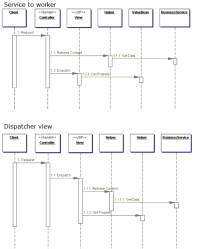
It’s worth noting that Service to Worker and Dispatcher View both combine Front Controller and View Helper. The difference is how much responsibility falls on the Controller or the View.
How to tell web frameworks apart
Once you set aside each framework’s internal architecture, which the application is shielded from, the most important consideration is how much it abstracts away HTTP. The higher the abstraction, the less the individual layers have to deal with HTTP itself. The figure below illustrates this nicely (Kito D. Mann, JavaServer Faces in Action, p. 20).
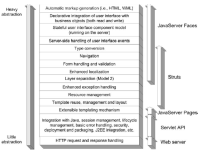
As you can see, Java Server Faces offers a higher level of abstraction than Struts or Spring MVC when building UI components and working with events. A framework at the same level as JSF is Tapestry. These are component-oriented frameworks. Struts-style frameworks are request-driven. When choosing a web framework, we should answer a few fundamental questions.
Component-oriented or request-driven?
The future certainly belongs to component-oriented frameworks because they let developers work at the level of UI components. That makes it possible to build tools with support for UI components baked in. On the other hand, a huge number of developers already know Struts and its best practices. If we don’t have the time to adopt JSF, why not reach for Struts or Spring MVC?
Standardized or proprietary?
The advantage of a standardized solution is the level of tooling support, especially for a Java standard such as JSF. Sun’s Java Studio Creator is a good example. You could call it the first real RAD tool for developing web applications in Java. Proprietary open-source solutions, on the other hand, are usually easier to adapt when something doesn’t suit you. They also don’t depend on how well a standard has been implemented.
Will you use JSP?
JSP isn’t always the technology chosen to generate dynamic content. Will the framework make it easy to use something like XSLT? JSF handles this well because it doesn’t depend on JSP. In fact, for JSF the question of whether to use JSP is fairly important, mainly because you can’t reasonably mix JSTL tags with JSF tags. JSF components and JSP have different life cycles.
One big advantage of Tapestry was its markup. You write HTML directly, adding Tapestry tags. At runtime, the tag contents are replaced with the corresponding values. In JSF, JSP can be replaced with Facelets, which some people strongly recommend.
Does it integrate easily with a bean container?
Application logic is often managed by containers such as Spring or EJB. Ideally, objects containing that logic are readily available to the web framework, or specifically to its Controller or View Helper. For example, Seam allows business logic implemented in a session bean to be exposed directly as a JSF backing bean (6).
Beyond the standard
Different JSF implementations offer extensions beyond the specification. Consider whether to tie yourself to a particular implementation and its extensions, which are often much needed, or to remain independent of the JSF implementation.
Conclusion
One of Java’s great advantages is the broad choice of web frameworks. Some see it as a disadvantage because so many options are hard to sort through. The point of this article was to emphasize that the features you require matter more than the framework’s name. I hope I’ve managed that. We should come back to this in the next podcast.
Notes
- [1] JSP is a subset of Servlettechnology, which is much more abstract. It works directly with a communication protocol such as HTTP or FTP and provides a basic API on top. Each JSP page is compiled into a servlet before its first request and then used.
- [2] It must implement javax.servlet.jsp.tagext.Tag directly or indirectly.
- [3] Swing is a Java example.
- [4] The Model represents the data itself and can also provide an interface to application logic.
- [5] The presentation The State Of Web Frameworks (PDF) by Craig R. McClanahan
- [6] In JSF, a backing bean is a View Helper that makes data from the application logic available.
Related articles
- (Dagblog, July 24, 2006) Three-Tier Architecture in a Nutshell II: Designing the Middle Tier
- (Dagblog, April 11, 2004) Three-Tier Architecture in a Nutshell I
- CZJUG — video recording of the presentation by Jason van Zyl (Maven), Miloš Kleint (Sun), and Craig McClanahan (creator of JSF and Struts)
- (Java.NET, April 10, 2006) Java Studio Creator 2
- J2EE core patterns
- (JavaWorld, July 19, 2004) Put JSF to work
- (OnJava, June 9, 2004) Improving JSF by Dumping JSP
- (IBM developerWorks, January 21, 2006) Facelets fits JSF like a glove
Frameworks mentioned
Medium version · Archived original page
Related articles
Related CZ Podcast episodes
- #217 · Ivo Lukačovič
On Windy, JavaScript and building companies. · Czech audio
- #3 · Java 6 SE, Vývoj webových aplikací
Dagi and Filemon discuss Java 6 and web application frameworks. · Czech audio
- #1 · Vývojová prostředí v Javě
The first CZ Podcast episode looks at Java development environments. · Czech audio