XML-RPC and one way to build richer web applications
Lately Michal and I have often discussed how to give web applications richer
graphical interfaces. We're essentially talking about what's possible today
with HTML, CSS and ECMAScript, and weighing the different aspects of each
technique that might work. First, it's worth noting that
we're discussing a cross-platform solution that will run in current browsers
without needing any extensions installed.
That constraint rules out some strong candidates based on Flash Player,
as well as XUL. I think the beginnings of rich Internet applications are in Flash Player, where
Macromedia's commercial Flex and the open-source Laszlo are already options. Say
we want to give our clients a richer GUI that makes things easier for
users. What would we need?
Components — strength in numbers
If we want to standardize parts of web applications, share code and
define common behavior such as skinning, we'll need
a component-based approach. We have to define a set of basic components
to serve as building blocks. What should they be? Examples
include buttons, inputs, combo boxes, trees, tables, calendars, panes and tabbed panes. Altogether
we're talking about ten to fifteen components.
It's one thing to define static components and another to make them work.
Making them interactive seems fairly tricky. We'll need controllers
for components on the client, and we'll also need controllers on the
server. Client-side controllers handle interactions in the local context
of the page. For example, when the user clicks a button, they call a specified
function to submit or validate. Server-side component controllers let us
keep state, such as an expanded tree or a date selected in a calendar,
for each component across requests.
So we have our components and defined interfaces for controlling them on
the client and server. To make things easier for users, it's worth
looking at the request-response model. Essentially any
small change on the client that needs data sent to the server annoys
users by making them wait for the whole page to reload. For our components, the question is
how to let them communicate as efficiently as possible.
Frame, iframe, object or XML-RPC?
With client-side scripting, it's fairly easy to use the standalone elements
HTML itself provides, especially frames. A simple script
that sets a frame's URL can send GET requests without
reloading the whole page. Of course, there are plenty of other uses for frames.
To my mind, the drawback of a frame is how cumbersome it is to call the server and
process a response in XML or HTML. Consider an error
on the server. The component has to do fairly complicated work to interpret what came back.
For communication between components, I think a better candidate is the protocol
XML-RPC. XML-RPC defines
simple rules for calling methods remotely by exchanging XML data with a fixed
structure. XML-RPC makes it easy to call any object exposed through
XML-RPC. There are plenty of clients that communicate through the protocol,
and you can find them for most of today's platforms or languages, including Java, .NET,
Delphi, PHP and others. Current browsers don't include a built-in
XML-RPC client, but implementing one isn't particularly difficult. There will also be a freely
available implementation.
An advantage of XML-RPC is that it can call the service layer directly if it's exposed through XML-RPC.
We don't have to define the facade layer that frames would require
to map individual GET or POST requests explicitly to service-layer calls.
The simple diagram below shows the whole model for communication between client-side components and
the application logic exposed by the service layer.
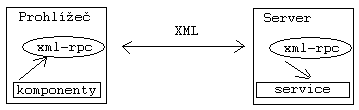
.
An example of using XML-RPC in JavaScript without a JavaScript
framework
function getUserInfo(){
  var xml = "";
  xml +="<?xml version=\"1.0\"?>\n";
  xml +="<methodCall>\n";
  xml +="<methodName>MyService.getUserInfo</methodName>\n";
  xml +="<params>\n";
  xml +="<param><value><string>Roman</string></value></param>\n";
  xml +="<param><value><string>Pichlík</string></value></param>\n";
  xml +="</params>\n";
  xml +="</methodCall>\n";
netscape.security.PrivilegeManager.enablePrivilege(“UniversalBrowserRead”);
httpRequest = new XMLHttpRequest();
  httpRequest.open(“POST”,“http://myserver/xmlrpc”);
  httpRequest.send(xml);
  httpRequest.onload = onHttpResponse;
}
function onHttpResponse(){
xml = httpRequest.responseText;
alert(xml);
}Medium version · Archived original page
Related articles
Related CZ Podcast episodes
- #217 · Ivo Lukačovič
On Windy, JavaScript and building companies. · Czech audio
- #3 · Java 6 SE, Vývoj webových aplikací
Dagi and Filemon discuss Java 6 and web application frameworks. · Czech audio