Eclipse tips: custom templates
I’m not the sort of user who explores every Eclipse feature with a regularity bordering on masochism, and perhaps that’s a shame. Few people would fail to appreciate Eclipse’s built-in templates, and I’m no exception. I’ll admit I used only the simpler ones, such as sysout => System.out.println().
Eclipse makes creating your own templates very easy. I came to appreciate that yesterday
when I was thinking about how to make common object tests easier to write. I had tests for equals and hashCode in mind.
You can find all the templates, both built-in and custom, in the Templates window under
Window >> Preferences >> Java >> Editor >> Templates.
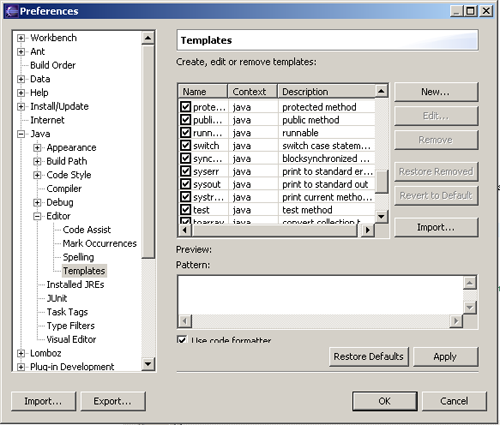
Alongside the ready-made templates, you can define your own for either Java code or Javadoc. Click the magic New button to start a template.
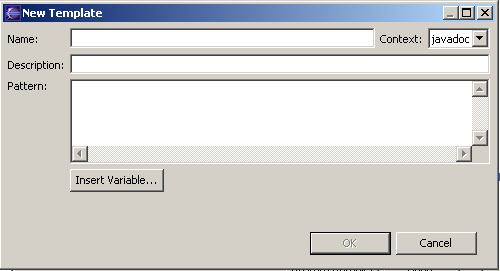
Name
The name you’ll use to call the template. I recommend something short and meaningful.
Description
A text description of the template.
Context
Choose whether the template applies to Java code or Javadoc.
Pattern
The contents of the template itself.
While writing a template, you may find the predefined variables under Insert variable useful. Variables are the engine behind templates. You can define as many as you like, but their power becomes apparent when you use them repeatedly.
Using variables
${objectUnderTest} o = new ${objectUnderTest}();
try{
    o.hashCode();
}catch(NullPointerException n){
    fail();
}
${objectUnderTest} o1 = new ${objectUnderTest}(${objectKey});
${objectUnderTest} o2 = new ${objectUnderTest}(${objectKey});assertTrue(o1.hashCode() == o2.hashCode());This template generates code to test the hashCode method for POJOs. Variables start with a dollar sign, and their names go inside curly braces. The template definesobjectUnderTestandobjectKey. When you use the template, setting a variable’s value updates all its declarations, as you’ll see shortly.
Invoking a template
Once the template is ready, you can invoke it in the code editor.
Type its name and press the completion shortcut, Ctrl+Space.
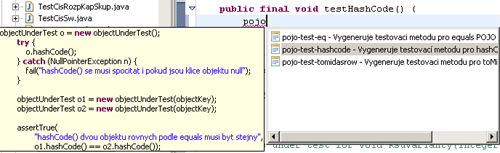
When you invoke the template, editable boxes appear around the variables. Setting a variable’s value updates every occurrence, as the next image shows with objectUnderTest being edited.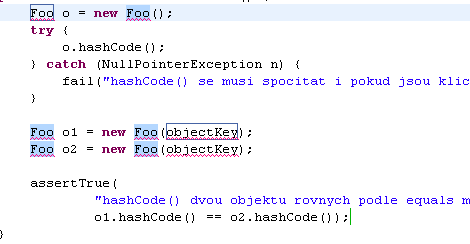
Related articles
Related CZ Podcast episodes
- #3 · Java 6 SE, Vývoj webových aplikací
Dagi and Filemon discuss Java 6 and web application frameworks. · Czech audio
- #1 · Vývojová prostředí v Javě
The first CZ Podcast episode looks at Java development environments. · Czech audio