Exploring the DOM IV: traversing a document
In this part of the series on the DOM specification, we'll look
at the basic methods and interfaces the Core module defines for traversing the model. First we'll
need a little more theory. A quick note before we begin. Unless stated otherwise, all links to DOM interfaces and methods
lead to the
DOM Level 2 Core specification.
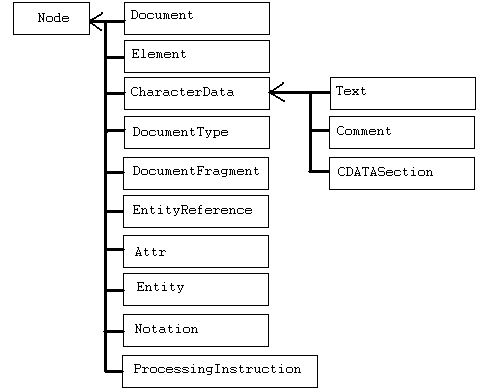
The DOM represents a document as a hierarchy of objects implementing the basic
Node
interface and other, more specific interfaces. Interfaces such as Element and Document
inherit from Node. The following diagram shows
the hierarchy of Core interfaces.
Consider the following piece of code.
- foo
- hoo
- bar
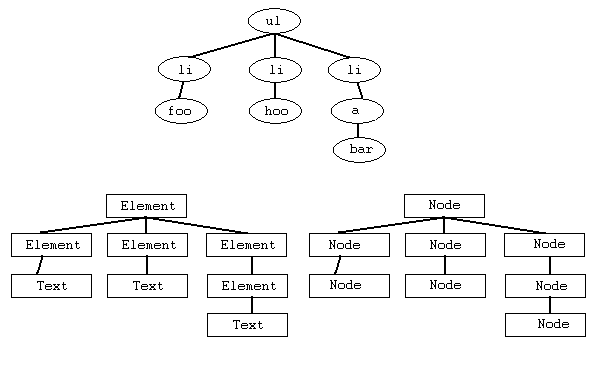
We can think of these elements as a tree of objects. Each object exposes a specific interface. As
we know, all of these interfaces inherit directly or indirectly from Node, so
we can think of all the nodes in terms of that interface, as shown in the following diagram.
Basic methods for retrieving parts of a document
Unfortunately, what many people think of as the DOM amounts to the methods
getElementById(element ID) and
getElementsByTagName(tag name) defined
by the Document interface. These methods really are
fundamental, but don't forget another method on the same interface, getElementsByTagNameNS(namespace, tag name),
which is useful when working with an XML document.
The use of getElementById(element ID) and getElementsByTagName(tag name) is so widely
known and common that I'll give only a couple of quick examples.
HTML:
	bar.com

   JavaScript:

    	  function underLine(status){
	    element = document.getElementById("foo");
	    element.style.textDecoration = (status)?"underline":"none";
	  }
If no element with the given ID is found, the method returns null. If the document
contains more than one element with the same ID, it returns the first. The popular substitute
document.getElementById = document.all behaves differently when several elements share an ID. It
returns a collection of them. Here is one possible replacement for getElementById using the all collection.
if (!document.getElementById){
     document.getElementById =
	   new Function("idname",
                        " kolekce_prvku=document.all(idname);
			  if (kolekce_prvku==null) return null;
			  if (kolekce_prvku.length)return document.all(idname)[0];
			  return document.all(idname);
                        ") ;
  }
Another simple example uses getElementsByTagName(tag name) to
set the target attribute on every a element.
HTML:
	bar.com
        bar.com

   JavaScript:

    	  elements = document.getElementsByTagName("a");
	  for(foo = 0; foo < elements.length; foo++){
	    elements[foo].target = "_blank";
	  }
The method returns a NodeList,
a collection of the selected elements.
That's it for today. Next time we'll talk about traversing the document using methods provided by
Node
and outline what the Traversal module offers.
You can try today's examples on the getElementsByTagName test page
and the getElementById test page.
Related articles
- (Dagblog, January 4, 2004) Exploring the DOM I
- (Dagblog, January 5, 2004) Exploring the DOM II: document structure and the object model
- (Dagblog, January 12, 2004) Exploring the DOM III: modules and levels
- (Dagblog, January 29, 2004) Exploring the DOM Exploring the DOM IV: traversing a document
- (Dagblog, February 24, 2004) Exploring the DOM Exploring the DOM V: traversing a document II
Related articles
Related CZ Podcast episodes
- #217 · Ivo Lukačovič
On Windy, JavaScript and building companies. · Czech audio
- #3 · Java 6 SE, Vývoj webových aplikací
Dagi and Filemon discuss Java 6 and web application frameworks. · Czech audio